h/p/cosmos®
treadmills & ergometers interface communication protocol
Created for the legal manufacturer: h/p/cosmos sports & medical gmbh Am Sportplatz 8
DE 83365 Nussdorf-Traunstein Germany
phone + 49 86 69 86 42 0
fax + 49 86 69 86 42 49
email@hpcosmos.com www.hpcosmos.com
EUDAMED ID: SRN: DE-MF-000006147
Authors:
M. Sc. Andreas Feil,
Altotec Hard- und Software GmbH Altofing 7, 83367 Petting / Germany
Franz Harrer
h/p/cosmos sports & medical gmbh
Am Sportplatz 8, DE 83365 Nussdorf-Traunstein
published: www.coscom.org article #: cos100115v4 date: 2025-09-17
Scope: applicable for all h/p/cosmos treadmills with Basic UDI-DI 4050588004002 (treadmill h/p/cosmos 150/50 G6 (pluto, mercury), 4050588004019 treadmill h/p/cosmos 150/50 (locomotion), 4050588004033 treadmill h/p/cosmos 170- 190/65 3p (quasar 3p, pulsar 3p), 4050588004040 treadmill h/p/cosmos 200-300/75-125 (venus, saturn) and their respective OEM models.
© Copyright 1992 - 2025 h/p/cosmos sports & medical gmbh
All rights reserved. This material (images, text, IP rights) may not be reproduced, distributed, or transmitted in any form or by any means without the prior written permission of the copyright holder, except in cases of fair use for non-commercial, educational, or personal purposes.
As a contribution to h/p/cosmos' efforts for development and updating the coscom protocol, all users of the coscom interface protocol and coscom features are obliged to list the name and company logo h/p/cosmos® and the copyright of h/p/cosmos® in their software menu and their user/operation manual on a well visible position.
Table of contents
coscom® safety test confirmation and official release document 10
Updates, downloads, simulators, regulatory affairs and publications 33
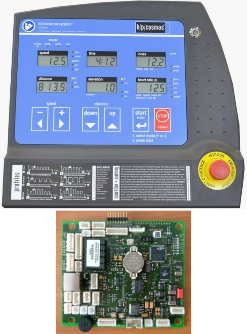
Figure 1: MCU1, built from 1988…1991 5
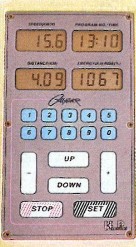
Figure 2: MCU2, built from 1991 … 2001 5
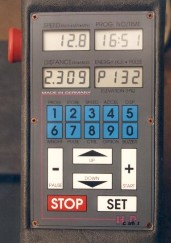
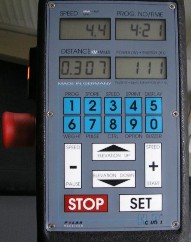
Figure 3: MCU3, built from 1996 … 2001 5
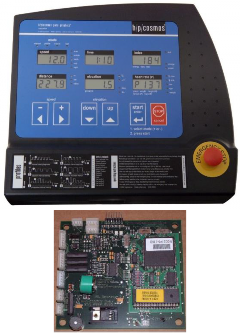
Figure 4: UserTerminal with MCU4 5
Figure 5: UserTerminal with MCU5 5
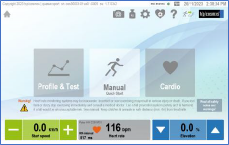
Figure 12: Example of request control on MCU 6 13
Figure 13: Communication example 14
Figure 14: Control states of MCU6 device without active external control 24
Figure 16: screenshot of error history logfile in MCU6 29
Figure 17: Example h/p/cosmos treadmill without UserTerminal: model “pluto lt med OEM” 31
Figure 18: Example for “request control” confirmation 31
[1] UserTerminals and Micro-Controller-Units MCU1 up to MCU6
The various MCU (MicroControllerUnit) generations of the h/p/cosmos devices, such as treadmills, bicycle and ladder ergometers:
|
|
|
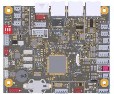
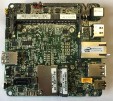
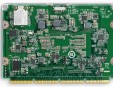
Figure 1: MCU1, built from 1988…1991 order # MCU1: MCU1 order # UserTerminal: interface: no external interface coscom: no firmware update: in factory only | Figure 2: MCU2, built from 1991 … 2001 order # MCU2 PCB: cos255a0225 order # UserTerminal: cos10498 interface: RS232 COM1 coscom: v1 and v2 firmware update: via EPROM | Figure 3: MCU3, built from 1996 … 2001 order # MCU3 PCB: order # UserTerminal: interface: 2 x RS232 COM1 and COM2 coscom: v2 firmware update: via RS232 PC upload |
|
|
Figure 4: UserTerminal with MCU4 built from 1997 … 2007 article # UserTerminal MCU4: cos00098110046 article # MCU4 PCB: cos25500000336 interface: 2 x RS232 COM1 and COM2 coscom: v2 and v3 firmware update: via EPROM | Figure 5: UserTerminal with MCU5 built from 2007 … 2023 article # UserTerminal MCU5: cos100060 article # MCU5 PCB: cos13745-03tm or cos13745-04tm interface: 4 x RS232 COM1, COM2, COM3, COM4 (option) coscom: v2 (terminated in 2019) and v3 and v4 |
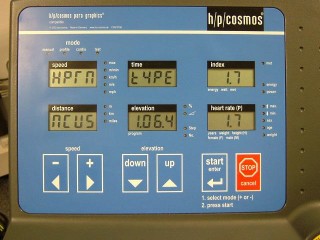
Checking the firmware version on MCU4 and MCU5 can be done either via coscom v3 or on the UserTerminal display of the treadmill (or through h/p/cosmos para control software and interface, in case there is no display on the treadmill:
After the machine is powered on, the display shows the Firmware version. or
When activating the user OPTION 05, the display also shows the Firmware version.
| display: | shows: |
speed | HPTM (TM = treadmill), or HPLE (LE = ladder ergometer | |
time | type | |
index | 1.7 = example for device code in Optional settings (see nameplate) | |
distance | MCU5, or MCU4 | |
elevation | 1.06.4 (example for firmware version) | |
heart rate | 1.7 (default device code based on firmware, which should match the device code on the type plate of the treadmill) |
For clarification a short table of available coscom versions on different MCU versions:
MCU2 | MCU 3 | MCU 4 | MCU 5 | MCU 6 | |
coscom v1 | x | X | |||
coscom v2 | x | ||||
coscom v3 | 4.04.5 or higher | x | |||
coscom v4 | 1.08.3.0083 and higher | x |
MCU4 Firmware updates are available at h/p/cosmos headquarter through EPROM replacement.
From MCU5 (built from November 2007 approx.) the h/p/cosmos treadmills have been equipped then with MCU5 where the firmware can be updated via RS232 interface and para control 4.2 PC software. Please send an email to service@hpcosmos.com with the serial number of the treadmill based on the type plate and check the installed firmware version (will also be shown on the treadmill display for a few seconds after powering on the machine) and ask for details in case of any queries.
Caution!
End-of-life (end of production) / End-of-support for coscom v3: 31.12.2023
End-of-life (end of production) for MCU5: 31.12.2023
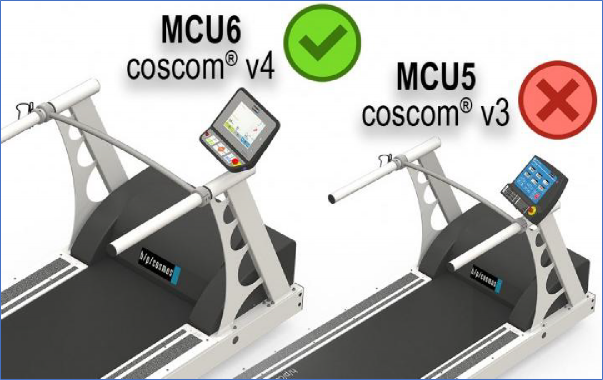
coscom v3 and coscom v3.dll and MCU5 were developed in 2007 and have been installed as standard since 2008 for h/p/cosmos treadmills, ergometers and endless ladder discovery with MCU4 and MCU5 UserTerminals. With the new MCU6 UserTerminal, coscom v3 is no longer possible, only coscom v4.
By the end of 2023, almost all h/p/cosmos treadmills in sizes 170/65 and 190/65 will still be available with both MCU5 and MCU6. From Jan. 2024 approx. h/p/cosmos will start production of MCU6 also for treadmill lines pluto and mercury with running deck size 150/50cm.
But from January 2024, availability of the MCU5 treadmill can no longer be guaranteed for all h/p/cosmos treadmill and ladder lines, among other things due to the discontinuation (end-of-life) of some electronic components and chips on the MCU5.
This coscom v4 interface protocol update applies to all h/p/cosmos treadmill deck sizes like:
device family | Basic UDI-DI based on EUDAMED |
treadmill h/p/cosmos 150/50 G6 (pluto, mercury) | Legacy Device |
treadmill h/p/cosmos 150/50 (locomotion) | Legacy Device 40505880023050 (UDI-DI) |
treadmill h/p/cosmos 170-190/65 MCU6 (quasar, pulsar) | Legacy Device |
treadmill h/p/cosmos 170-190/65 3p (quasar 3p, pulsar 3p) | Legacy Device |
treadmill h/p/cosmos 170-190/65 3p (quasar 3p, pulsar 3p) | Legacy Device |
treadmill h/p/cosmos 200-300/75-125 (venus, saturn) | Legacy Device |
treadmill h/p/cosmos 450/300 (saturn 450/300rs) | Legacy Device / Sports Device |
treadmill h/p/cosmos 150/50 G7 (pluto, mercury) | 4050588cos31000R4 / GTIN-14 GS1 |
treadmill h/p/cosmos 170-190/65 (quasar, pulsar) | 4050588cos30003-015X / GTIN-14 GS1 |
All MCU6 devices with TouchScreen but also LT-versions without UserTerminal only support coscom v4!
Upgrade your compatible devices and software to coscom v4 in time.
Update your tender specifications, quotations, brochures, websites and article texts in time.
Introduced in 2017, coscom v4 has been significantly improved and is the current and new internal h/p/cosmos standard for interface communication.
Therefore please upgrade your external host devices to coscom v4 in time to stay compatible.
See also https://www.hpcosmos.com/en/news/end-life-end-support-coscom-v3-31122023
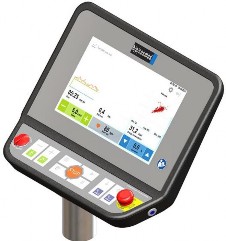
UserTerminal MCU6 and TouchScreen
|
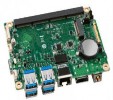
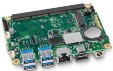
| UserTerminal with MCU6 GUI Graphic User Interface Windows 10 OS 10.1” TouchScreen built from 2019 … article # UserTerminal MCU6: cos101000-01 article # MCU6 PCB: cos101010-01, cos101010-02 article # Intel® NUC1 SBC PC: cos101000i article # Intel® NUC11 SBC PC: cos101000i-01 article # Intel® CarrierBoard ButlerBeach cos101000bd article # Intel® CarrierBoard GardenBeach cos101000bd-01 interface: 1 x RS232 COM1, NFC, RFID, USB, LAN, BlueTooth via USB stick, WiFi via USB stick coscom: v4 (other protocols not validated by h/p/cosmos but by system integrator!) firmware update: via USB memory stick The main components of the GUI UserTerminal are the MCU6 sensor actor board and the SBC single board computer with Windows 10, featured by a 10.1” TouchScreen and number of peripheral devices. |
[2] Overview
h/p/cosmos coscom v4 defines an interface for basic device control. At the moment, the protocol is designed for five different device types (not all are available on the market right now):
h/p/cosmos running machines (treadmill ergometers)
h/p/cosmos ladder ergometers
h/p/cosmos ergometers
h/p/cosmos steppers
h/p/cosmos cross trainers

Device
Service
Actions
Variables
Future services...
The interface consists of one device which currently has one service (index 0). The service has several actions and variables with which the device can be controlled. In future, there could be an update which can add new services if necessary.
The protocol has a general request – response design. External software is always allowed to send a request but must wait for the corresponding answer before sending the next request (only one message can be pending). For active control see chapter safety considerations.
In order to get actual variable values, you can either query the latest value of a variable (so called polling) or get an automatic event message, when the variable value changes (see chapter eventing).
h/p/cosmos coscom v4 uses serial interface for communication. In order to distinguish between version 3 the baud rate is changed to 19200.
[3] coscom® safety test confirmation and official release document
Please note that for staying in compliance with safety related issues a quality assurance & regulatory affairs agreement is necessary. This states that a communication test including log files have to be done. For further information see official document on coscom.org. Current version can be found at:
https://www.coscom.org/coscom_v4/20250108_hpcosmos_coscom_v4_QA_RA_sample.docx
[4] Basic message format
h/p/cosmos coscom v4 is a UTF-8 based protocol. Every message starts with “*” followed by a
character which indicates the message type:
“*A” indicates an action request or response. Parameters are described with “*I” for input parameters followed by a parameter index and “:” as delimiter for the parameter value. Output parameters follow the same scheme but with character “O”. Example request:
*A0s0*I0:<FirstParameterValue>*I1:<SecondParameterValue>*Y0:8D*Z
“*Q” followed by a variable index indicates a variable query request or response:
Request example for variable with index 0 on service index 0:
*Q0s0*Y0:4E*Z
Response example for a variable with index 0 on service index 0:
*Q0s0:<CurrentValue>*Y0:E2*Z
Querying variables which are not supported by current device type will result in an error response.
“*E” indicates an event message. For further information see chapter “eventing”.
“*R” is a special response message this is sent when a wrong checksum was detected. See chapter error messages for details.
After the “main” character follows the service index “s” + index of service. Currently there is only one
service defined, so this will always be “s0”. A coscom v4 device will accept messages where no service index is defined (missing “s0”). If this is the case a default service index of 0 is assumed. A device is also allowed to send messages with missing “s0” service index.
Every h/p/cosmos coscom v4 message ends with the checksum extension followed by “*Z”.
The “*” character is reserved as protocol delimiter therefore any “*” in an argument or variable value must be escaped with “*X”. Example: If you want to send a message with “RequestControl” action which contains a “*” character, you would have to escape it:
*A3s0*I0:My own text with a *X character*Y0:09*Z
h/p/cosmos coscom v4 defines a max. message length for incoming requests (external software to device) of 64 bytes and a max message length of 250 bytes for outgoing message.
[5] Checksum extension
Every coscom v4 message must use the checksum extension. This is necessary because of RS232 support, where no data link layer exists.
request example: *A2s4*I0:2*I1:3*I2:0*Y0:73*Z
response example: *A2s4*Y0:44*Z
The calculation of the checksum is done by getting all UTF-8 bytes for the characters starting by the first ‘*’ character of the message and ending before the message end “*Z”. The bytes have to be added and computed modulo 256. The hexadecimal representation of the result is the actual checksum.
[6] Error messages
A h/p/cosmos device waits till it receives a “*Z” indicating that a whole coscom message was
received. If this part of the message is disturbed the external software will run in a timeout.
If a h/p/cosmos device detects a “*Z” it parses the checksum of the received message. If no
checksum is attached or an invalid checksum is detected it will send a general error response
*R1*F0:<ErrorNumber>*R1:<ErrorText>*Y0:84*Z. The error description
(“*F1:Errortext”) is optional and can be left out.
If an h/p/cosmos device detects a wrong parameter (e. g. speed out of range) in an otherwise correct message it will send an error response message to the external software. An error message starts with the same Indices as the request but is followed by a “*F0:”, an error number, “*F1:” and an error description. An example looks like this: *A0s0*F0:123*F1:ErrorText*Y0:38*Z
The error description (“*F1:ErrorText”) is optional an can be left out.
[7] Eventing
For getting variable changes you can either use polling method be querying the current variable values. This is according to the general request -response design of the protocol. If you want to get automatic messages of the device, if variable values change, you can use so called eventing. This an extension of the protocol where the device sends messages without an explicit request. You can use action “SetEventMask” to control which variables should send automatic changes (default after switching device on: all off).
RS232 does not allow for discovering connection change therefore event mask could be set to any value when you are connecting. A precursor could have set it according to his needs. Best practice is to set event mask at connecting time to your needs (if you don’t want any events, set all off.)
A service publishes changes to its variables by sending so called event messages. These messages contain the indices of one or more variables and the current value of those variables. There can be more than one value in a single event message, if more variables change at the same time.
An initial event message is sent when subscription changes by “SetEventMask”. This event message contains the indices and values for all evented variables and allows the subscriber to initialize its model of the state of the service.
Event messages are tagged with an event key, which has one digit. The event key for a subscription is initialized to 0 when the device sends the initial event message. For each subsequent event message, the device increments the event key for a subscription, and includes that updated key in the event message. Event keys handle overflow and wrap the event key from 9 back to 1 (not 0). Subscribers must also handle this special case when the next event key is not an increment of the previous key.
To repair an event subscription, e.g., if a subscriber has missed one or more event messages, a subscriber must re-subscribe by invoking “SetEventMask” again. By doing so, the subscriber will get a new initial event message, and a new event key.
Following the general event syntax (for better reading the elements are put in separate lines):
*Eevent keysservice index
*Vvariable index:variable value
other variables and their values go here, if any
*Y0:xx*Z
An actual example message with event key 1 and two variable updates (Index 0 and 1) of service 0
would look like this:
*E1s0*V0:<value1>*V1:<value2>*Y0:A9*Z
[8] Safety considerations
One goal was making h/p/cosmos coscom v4 more secure. h/p/cosmos coscom v3 has several safety features. But not all of them were mandatory. Over the last years regulations for medical devices have become more severe. In order to meet these concerns h/p/cosmos has changed some safety features and made them mandatory. Following the basic safety procedure of h/p/cosmos coscom v4 will be described.
[8A] GetDeviceInformation
In order to check if a h/p/cosmos coscom v4 device is present, you must use action
“GetDeviceInformation”. You will get device type, the variant (distinguish between treadmill, ladder
ergometer, bicycle and stepper), serial number and firmware version of the connected device.
[8B] Request control – fail-safe and stop state
NOTE: Devices without UserTerminal (at h/p/cosmos called “LT” device, for example model “pluto lt med OEM”) will always allow external control, because these models do not have display or keyboard to confirm. “request control” can be implemented but is not mandatory in this case.
An external device can send a h/p/cosmos coscom v4 message at any time. But before actively controlling the device by changing any load (speed, elevation, power, start or stop command) you first must request control allowance by using action “RequestControl”. With MCU6 devices this can
be done anytime, MCU5 devices must be in mode selection state. After invoking this action, the user will see a message on the user terminal (if device hardware supports displaying text) where he must confirm external control allowance. If he accepts, variable “ControlAllowed” will change to “Allowed” if he declines the request, “NotAllowed” will be set. While the request is shown
“RequestPending” will be set. If it’s a device without terminal, the message will not be shown and control will be granted immediately. When implementing coscom v4 it is mandatory to consider a device where request control could be not accepted.
You can only actively control the device when “ControlAllowed” is set. Control is then generally allowed as long as control state “stopped” is reached. This could e. g. be by pressing the stop button on the terminal twice (first will show summary screen, second stop will go to main menu).
Sending the “Stop” action will set control state to “stop”.
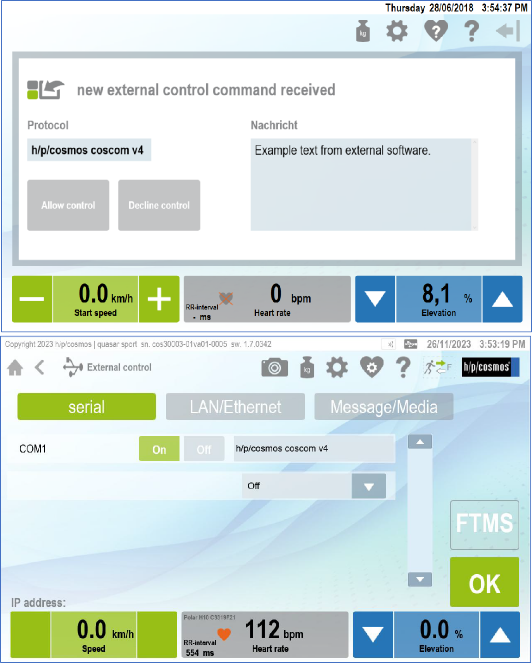
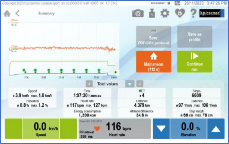
Figure 12: Example of request control on MCU 6
If variable “ControlAllowed” changes to “NotAllowed” external software must cancel current
control profile. In order to start controlling again, you have to repeat requesting control.
While external control is allowed, using Failsafe for detecting communication loss is mandatory.
You have to invoke action “SetFailsafe” within e v e r y s e c o n d while controlling the device. If the device does not receive the message within one second, the device will stop and control will be revoked. Once failsafe is activated due “SetFailSafe” every valid coscom message received by MCU will reset the current interval.
This concept ensures that a stop state of the device is “detected” (by getting an error response to an active control request) by external software even if variable “ControlState” is not monitored.
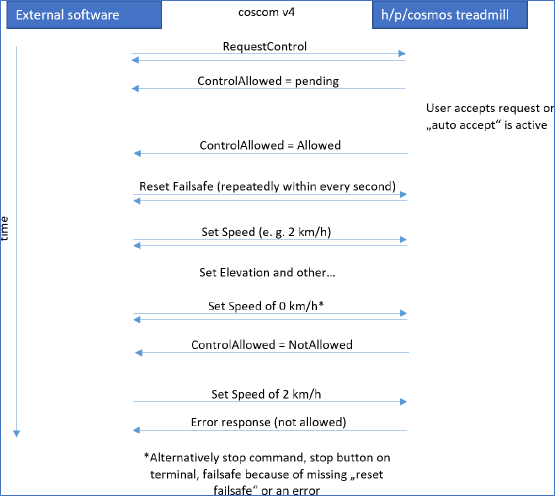
Figure 13: Communication example
For a small state chart see variable “ControlAllowed”.
[8C] TLS over TCP/IP
Beginning with MCU6 devices it is possible to use TCP/IP for external control of the device. We optionally implemented TLS as a security feature. Option 505 indicates if TLS must be used with external TCP/IP connections.
[9] Feature Matrix
h/p/cosmos coscom v4 is designed to meet different device types. But not all device types support all defined actions and variables. Following matrix will address this issue:
Action/Device type | Treadmill | Ergometer | Ladder | Cross trainer | Stepper |
GetDeviceInformation | x | x | x | x | x |
SetEventMask | x | x | x | x | x |
RequestControl | x | x | x | x | x |
ResetFailsafe* | x | x | x | x | x |
SetSpeed* | x | x | |||
GetSpeedRange | x | x | |||
GetAccelDecelRange | x | x | |||
HoldSpeed* | x | x | |||
SetElevation* | x | ||||
SetElevationWithSpeed* | x | ||||
GetElevationRange | x | ||||
HoldElevation* | x | ||||
SetPower* | x | x | x | ||
SetTorque* | x | x | x | ||
SetCadence* | x | x | |||
Start* | x | x | x | x | x |
Stop* | x | x | x | x | x |
SetPersonData* | x | x | x | x | x |
GetPersonData | x | x | x | x | x |
ResetCounterValues* | x | x | x | x | x |
Beep* | x | x | x | x | x |
* Using this action without external control permission will result in an
error response (see chapter “Safety considerations”).
Variable/Device type | Treadmill | Ergometer | Ladder | Cross trainer | Stepper |
ControlStatus (Index: 0) | x | x | x | x | x |
ControlAllowed (Index: 1) | x | x | x | x | x |
ActualSpeed (Index: 2) | x | x | x | ||
TargetSpeed (Index: 3) | x | x | x | ||
ActualElevation (Index: 4) | x | ||||
TargetElevation (Index: 5) | x | ||||
ActualPower (Index: 6) | x | x | x | x | x |
TargetPower (Index: 7) | x | x | x | ||
ActualTorque (Index: 18) | x | x | |||
TargetTorque (Index: 19) | x | x | |||
EnergyConsumption (Index: 8) | x | x | x | x | x |
MET (Index: 9) | x | x | x | x | x |
Time (Index: 10) | x | x | x | x | x |
Distance (Index: 11) | x | x | x | x | |
ActualCadence (Index: 12) | x | x | |||
TargetCadence (Index: 21) | x | x | |||
Height (Index: 13) | x | x | x | ||
HeartRate (Index: 14) | x | x | x | x | x |
RRInterval (Index: 15) | x | x | x | x | x |
Errors (Index: 16) | x | x | x | x | x |
StepHeight (Index: 20) | x | x |
[10] Actions
Following you will find a short description with syntax sample of every coscom v4 action of basic remote service.
Note: If no other description is given, values are defined as floating point values expected with max. six decimal places and maximal value +/- 1.000.000. Integer values are defined as signed 32-bit values. String values max.
[10A] GetDeviceInformation
(Action index: 0) Gets basic device information for detecting if a h/p/cosmos coscom v4 device is available.
Parameters:
DeviceType (direction out - index 0, max. length: 64 characters ):
e. g. urn:schemas-coscom-org:device:LadderErgometer:1
If returned device type is “urn:schemas-coscom-org:device:MCU5coscomV4:1” restrictions
described in section “MCU5 legacy device” apply.
Variant (direction out- index 1, digit): Number that indicates the actual variant type.
Possible Values:
0 = Treadmill Ergometer
1= Ladder
2 = Cross trainer
3 = Stepper
4 = Bicycle Ergometer
Serial Number (direction out – index 2, max. length: 50 characters): serial number string
FirmwareVersion (direction out – index 3, max. length: 11 characters): Current firmware version
Syntax sample request: *A0s0*Y0:3E*Z
Syntax sample response: *A0s0*O0:urn:schemas-coscom- org:device:MCU6coscomV4:1*O1:1*O2:cos30007-01va06-0003*O3:1.0.0001*Y0:8A*Z
[10B] SetEventMask
(Action index: 1) As described in chapter “eventing” with this method it is possible to enable or disable automatic value change transmission of the device. After switching on the device all events are disabled. Changing the event mask will lead to new initial events and new event index in the event messages (see chapter “eventing”).
Parameters
EventMask (direction in – index 0): a string consisting of 0 and 1 indicating if eventing for specific variables should be turned on. The position in the string determines the variable index. For example, the string 100101 enables eventing for variables with indices 0, 2 and 5. Leading 0 can be left out. The string starts with the highest variable index and ends with index 0. For variable indices see chapter variables. For variable indices which are not supported in the current device type changes to event mask will have no effect.
Syntax sample request: *A1s0*I0:1001*Y0:DE*Z
Syntax sample response: *A1s0*Y0:3F*Z
[10C] RequestControl
(Action index: 2) With this action external control can be requested. It must be done before actively
controlling the device. For further information on controlling the device see chapter “Safety
considerations”. With MCU6 this action can be invoked anytime. MCU5 devices must be in selection or pause state. Otherwise MCU5 will send an error response. If device is not configured to auto accept requests the external control request is shown to the user which has 10 minutes to accept or decline the request. After 10 minutes the request will automatically be declined. The state can be monitored with ControlAllowed variable.
Parameters
Message (direction in – index 0, max. length: 45 characters): a string which will be shown to the user when he should accept external control. Because of different hardware types it is not guaranteed that the message is shown to the user. If no message should be shown, enter an empty string (request: *A2s0*I0:*Y0:1D*Z)
Syntax sample request: *A2s0*I0:external software name wants to control*Y0:3D*Z
Syntax sample response: *A2s0*Y0:40*Z
[10D] ResetFailsafe
(Action index: 3) This action must be invoked regularly within 1 second while external control is allowed. For more information see chapter “Safety considerations”. If the action is invoked when controlling is not allowed an error response will be sent back from the device (see chapter “error
messages”). Failsafe interval will also be reset when MCU is receiving a valid (valid checksum) coscom message.
Parameters
No parameters defined
Syntax sample request: *A3s0*Y0:41*Z
Syntax sample response: *A3s0*Y0:41*Z
[10E] SetSpeed
(Action index: 4) With this action you can set a new speed with given acceleration. Using this action without external control permission will result in an error response (see chapter “Request control – fail-safe and stop state”). If speed or acceleration parameter is out of range, an error response will be sent.
Parameters
Speed (direction in - index 0): The new target speed in m/s.
Acceleration (direction in – index 1): The acceleration to be used with this command in m/s².
Syntax sample request (speed: 1.3 m/s, acceleration 0.2 m/s²):
*A4s0*I0:1.30*I1:0.20*Y0:7F*Z
Syntax sample response: *A4s0*Y0:42*Z
[10F] GetSpeedRange
(Action index: 5) Returns the current speed range of the device. The range can vary from its base value if it is additionally limited in the option settings of the device.
Parameters
MinimalSpeed (direction out - index 0): Current minimal speed in m/s.
MaximalSpeed (direction out – index 1): Current maximal speed in m/s.
Syntax sample request: *A5s0*Y0:43*Z
Syntax sample response (min 0 m/s, max 6.11 m/s): *A5s0*O0:0.00*O1:6.11*Y0:8E*Z
[10G] GetAccelDecelRange
(Action index: 6) Returns the current acceleration/deceleration range of the device. The range can vary from its base value if it is additionally limited in the option settings of the device.
Parameters
MinAcceleration (direction out - index 0): Current minimal acceleration/deceleration in m/s².
MaxAcceleration (direction out – index 1): Current maximal acceleration/deceleration in m/s².
Syntax sample request: *A6s0*Y0:44*Z
Syntax sample response (min 0.1 m/s², max: 0.6 m/s²): *A6s0*O0:0.10*O1:0.60*Y0:8E*Z
[10H] HoldSpeed
(Action index: 7) Can be used to hold the current speed at a constant level. Using this action without
external control permission will result in an error response (see chapter “Safety considerations”).
Parameters
No parameters defined
Syntax sample request: *A7s0*Y0:45*Z
Syntax sample response: *A7s0*Y0:45*Z
[10I] SetElevation
(Action index: 8) With this action you can set a new elevation. Using this action without external control permission will result in an error response(see chapter “Request control – fail-safe and stop state”). If elevation parameter is out of range, an error response will be sent.
Parameters
Elevation (direction in - index 0): The new target elevation in %.
Syntax sample request (elevation: 3.3 %): *A8s0*I0:3.30*Y0:E7*Z
Syntax sample response: *A8s0*Y0:46*Z
[10J] SetElevationWithSpeed
(Action index: 18) With this action you can set a new elevation with optional elevation speed. Using this action without external control permission will result in an error response (see chapter “Request control – fail-safe and stop state”). If elevation parameter is out of range, an error response will be sent.
Parameters
Elevation (direction in - index 0): The new target elevation in %.
ElevationSpeed (direction in – index 1): The elevation speed to be used with this command in °/s. If the device does not support elevation speed, this parameter will be ignored. To use the default elevation speed, set this parameter to 0.
Syntax sample request (elevation: 3.3 %, speed: default):
*A18s0*I0:3.30*I1:0*Y0:26*Z
Syntax sample response: *A18s0*Y0:77*Z
[10K] GetElevationRange
(Action index: 9) Returns the current elevation range of the device. The range can vary from its base value if it is additionally limited in the option settings of the device.
Parameters
MinimalElevation (direction out - index 0): Current minimal elevation in %.
MaximalElevation (direction out – index 1): Current maximal elevation in %.
Syntax sample request: *A9s0*Y0:47*Z
Syntax sample response (min: 0 %, max: 22 %): *A9s0*O0:0.00*O1:22.00*Y0:BE*Z
[10L] HoldElevation
(Action index: 10) Can be used to hold the current elevation at a constant level. Using this action without external control permission will result in an error response (see chapter “Request control – fail-safe and stop state”) .
Parameters
No parameters defined
Syntax sample request: *A10s0*Y0:6F*Z
Syntax sample response: *A10s0*Y0:6F*Z
[10M] SetPower
(Action index: 11) Can be used to set a new target power. Using this action without external control permission will result in an error response(see chapter “Request control – fail-safe and stop state”).
Parameters
Power (direction in - index 0, integer): New target power in watts.
Syntax sample request: *A11s0*I0:50*Y0:B2*Z
Syntax sample response: *A11s0*Y0:70*Z
[10N] SetTorque
(Action index: 16) Can be used to set a new target torque. Using this action without external control permission will result in an error response (see chapter “Request control – fail-safe and stop state”).
Parameters
Torque (direction in - index 0): New target torque in nm.
Syntax sample request: *A16s0*I0:6.50*Y0:1B*Z
Syntax sample response: *A16s0*Y0:75*Z
[10O] SetCadence
(Action index: 17) Can be used to set a new target cadence. Using this action without external control permission will result in an error response (see chapter “Request control – fail-safe and stop state”).
Parameters
Cadence (direction in - index 0, integer): New target cadence in rpm.
Syntax sample request: *A17s0*I0:80*Y0:BB*Z
Syntax sample response: *A17s0*Y0:76*Z
[10P] Start
(Action index: 12) Starts external control mode. Using this action without external control permission will result in an error response (see chapter “Safety considerations”). In order to start external control after getting permission you can either set a new target value (speed, elevation or power) or use this action to only switch or start the mode and not changing current target values. This can be helpful if you want to switch from a running device mode (e. g. cardio) to external control without setting a new target right now.
Parameters
No parameters defined
Syntax sample request: *A12s0*Y0:71*Z
Syntax sample response: *A12s0*Y0:71*Z
[10Q] Stop
(Action index: 13) Stops external control mode and the device. Using this action without external control permission will result in an error response (see chapter “Request control – fail-safe and stop state”). “ControlAllowed” will be revoked after using this action.
Parameters
No parameters defined
Syntax sample request: *A13s0*Y0:72*Z
Syntax sample response: *A13s0*Y0:72*Z
[10R] SetPersonData
(Action index: 14) Sets the current person data of the individual that is using the device. These values will affect energy consumption calculation and cardio default values. Using this action without external control permission will result in an error response (see chapter “Request control – fail-safe and stop state”).
Parameters
Gender (direction in - index 0): ‘F’ = Female, ‘M’ = Male.
Age (direction in - index 1, integer): age in years (1-150)
Height (direction in - index 2, integer): 1 – 300 cm
Weight (direction in – index 3): 1-300 kg
Syntax sample request (male, 26 years, 176 cm, 73 kg):
*A14s0*I0:M*I1:26*I2:176*I3:73*Y0:AA*Z
Syntax sample response: *A14s0*Y0:73*Z
[10S] GetPersonData
(Action index: 20) Gets the current person data of the individual that is using the device. Parameters
Gender (direction out - index 0): ‘F’ = Female, ‘M’ = Male.
Age (direction out - index 1, integer): age in years (1-150)
Height (direction out - index 2, integer): 1 – 300 cm
Weight (direction out – index 3): 1-300 kg
Syntax sample request: *A20s0*Y0:70*Z
Syntax sample response (male, 26 years, 176 cm, 73 kg):
*A20s0*O0:M*O1:26*O2:176*O3:73*Y0:BF*Z
[10T] ResetCounterValues
(Action index: 15) Resets current parameters like time, distance, energy consumption, height. After using this action these parameters will be set to 0 but continue counting. Using this action without external control permission will result in an error response (see chapter “Request control – fail-safe and stop state”).
Parameters
No parameters defined
Syntax sample request: *A15s0*Y0:74*Z
Syntax sample response: *A15s0*Y0:74*Z
[10U] Beep
(Action index: 19) Gives external software a change to acoustical warn the user of load changes. You should use this action in order to warn users before changing any load. Using this action without external control permission will result in an error response (see chapter “Request control – fail-safe and stop state”).
Parameters
Duration (direction in – index 0, integer): Beep time in 1/100 seconds (0 to 2.55 s).
Syntax sample request: *A19s0*I0:100*Y0:E6*Z
Syntax sample response: *A19s0*Y0:78*Z
[11] Variables
h/p/cosmos coscom v4 defines one service with following variables:
Note: If no other description is given, values are defined as floating point values expected with max. two decimal places and maximal value +/- 1.000.000. Integer values are defined as signed 32-bit values. String values max.
[11A] ControlStatus
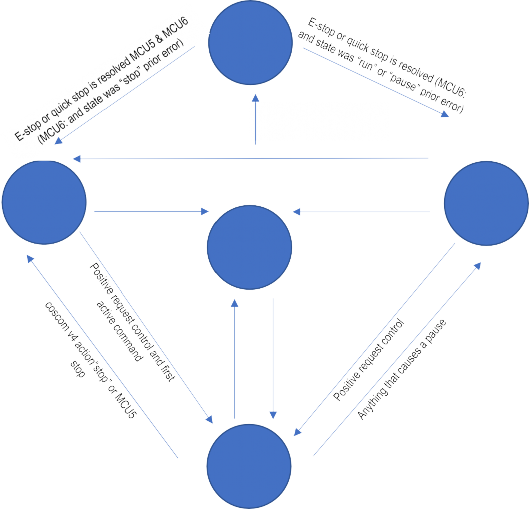
(Variable index: 0) Independent from which mode (Quickstart, Profile, Cardio, Extern, Test) is running this variable indicates the current control state. Possible values are:
0 = Stop (device is somewhere in menu) 1 = EmergencyStop
2 = Run
3 = Pause
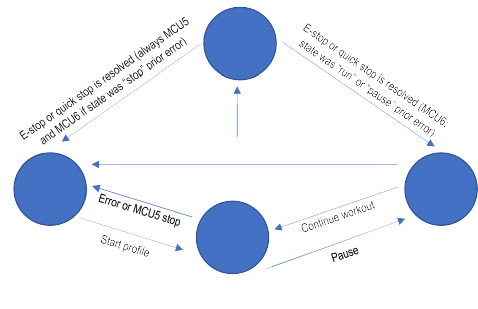
Pause is defined as running belt and time counting is stopped. This can be achieved following:
MCU5: Pressing the “-“ button or setting speed to 0 km/h till running belt is stopped in all modes except stepper profile, test profile mode and external control over coscom v4.
E-Stop
E-stop or quick stop at anytime
Stop
Back to main menu, standby or Error
Pause
Run
MCU6: Pressing the “Stop” button while in running mode. This will switch in the summary screen which is interpreted as a pause before control is finally stopped or continued.
Figure 14: Control states of MCU6 device without active external control
Syntax sample query request: *Q0s0*Y0:4E*Z
Syntax sample query response (Run state): *Q0s0:1*Y0:B9*Z
[11B] ControlAllowed
(Variable index: 1) Value that indicates if external control is allowed right now. Possible values are:
0 = Allowed (control can be done by external software)
1 = RequestPending (User has yet to decide if external software is allowed)
E-Stop
(NotAllowed))
E-stop or quick stop at anytime
Stop
Stop
(NotAllowed)
Pause
(NotAllowed)
Start workout
Run
(NotAllowed)
Continue workout
Run
(Allowed)
2 = NotAllowed (control is not allowed)
Speed value of 0 km/h
MCU6: Positive request control
Syntax sample query request: *Q1s0*Y0:4F*Z
Syntax sample query response (request pending): *Q1s0:1*Y0:BA*Z
[11C] ActualSpeed
(Variable index: 2) Gets the current speed value in m/s.
Syntax sample query request: *Q2s0*Y0:50*Z
Syntax sample query response: *Q2s0:2.10*Y0:4B*Z
[11D] TargetSpeed
(Variable index: 3) Gets the target speed value in m/s.
Syntax sample query request: *Q3s0*Y0:51*Z
Syntax sample query response: *Q3s0:3.50*Y0:51*Z
[11E] ActualElevation
(Variable index: 4) Gets the current elevation value in %.
Syntax sample query request: *Q4s0*Y0:52*Z
Syntax sample query response: *Q4s0:3.50*Y0:52*Z
[11F] TargetElevation
(Variable index: 5) Gets the target elevation value in %.
Syntax sample query request: *Q5s0*Y0:53*Z
Syntax sample query response: *Q5s0:5.20*Y0:52*Z
[11G] ActualPower
(Variable index: 6, integer) Gets the current power value in watts.
Syntax sample query request: *Q6s0*Y0:54*Z
Syntax sample query response: *Q6s0:125*Y0:26*Z
[11H] TargetPower
(Variable index: 7, integer) Gets the target power value in watts.
Syntax sample query request: *Q7s0*Y0:55*Z
Syntax sample query response: *Q7s0:175*Y0:2C*Z
[11I] ActualTorque
(Variable index: 18) Gets the current torque value in nm.
Syntax sample query request: *Q18s0*Y0:87*Z
Syntax sample query response: *Q18s0:6.30*Y0:88*Z
[11J] TargetTorque
(Variable index: 19) Gets the target torque value in nm.
Syntax sample query request: *Q19s0*Y0:88*Z
Syntax sample query response: *Q19s0:6.50*Y0:8B*Z
[11K] EnergyConsumption
(Variable index: 8) Gets the energy consumption of this workout in kj.
Syntax sample query request: *Q8s0*Y0:56*Z
Syntax sample query response: *Q8s0:213.23*Y0:B9*Z
[11L] MET
(Variable index: 9) Gets the current MET (metabolic equivalent) value of this workout.
Syntax sample query request: *Q9s0*Y0:57*Z
Syntax sample query response: *Q9s0:85*Y0:FE*Z
[11M] Time
(Variable index: 10, integer) Gets the current workout time in seconds.
Syntax sample query request: *Q10s0*Y0:7F*Z
Syntax sample query response: *Q10s0:600*Y0:4F*Z
[11N] Distance
(Variable index: 11) Gets the current distance value of this workout in meters.
Syntax sample query request: *Q11s0*Y0:80*Z
Syntax sample query response: *Q11s0:10.25*Y0:B0*Z
[11O] ActualCadence
(Variable index: 12, integer) Gets the current rotation frequency (RPM = rounds per minute).
Syntax sample query request: *Q12s0*Y0:81*Z
Syntax sample query response: *Q12s0:80*Y0:23*Z
[11P] Height
(Variable index: 13) Gets the current positive altitude difference in meters which has been gathered in this workout. In case of treadmill a negative value can be achieved if running direction is changed to backwards running.
Syntax sample query request: *Q13s0*Y0:82*Z
Syntax sample query response: *Q13s0:235*Y0:56*Z
[11Q] HeartRate
(Variable index: 14, integer) Gets the current heart rate value of the test person. If no heart rate is detected value will be 0.
Syntax sample query request: *Q14s0*Y0:83*Z
Syntax sample query response: *Q14s0:140*Y0:52*Z
[11R] RRInterval
(Variable index: 15, integer) Gets the latest RR-interval (beat-to-beat interval of the heart rate). This variable should be monitored using events in order to get all value changes. If RR-interval is not known (not supported or no heart rate available) the value will be 0.
Syntax sample query request: *Q15s0*Y0:84*Z
Syntax sample query response: *Q15s0:862*Y0:5E*Z
[11S] Errors
(Variable index: 16, semicolon separated list of errors) Gets the current error and service notes values of the device. If no error or service note is active, string will be empty. Errors start with “E” followed by three digits. Service notes start with “S” again followed by three digits e .g “E153” or “S102”. Errors are defined in the user manual of the device.
Syntax sample query request: *Q16s0*Y0:85*Z
Syntax sample query response (errors 100 and 303): *Q16s0:E100;E303*Y0:AB*Z
[11T] StepHeight
(Variable index: 20) Gets the current step height in mm.
Syntax sample query request: *Q20s0*Y0:80*Z
Syntax sample query response: *Q20s0:203*Y0:4F*Z
[11U] TargetCadence
(Variable index: 21, integer) Gets the target rotation frequency (RPM = rounds per minute).
Syntax sample query request: *Q21s0*Y0:81*Z
Syntax sample query response: *Q21s0:80*Y0:23*Z
[12] Error Codes
coscom v4 defines following error codes:
Code | Description |
111 | Internal error prevents external command (like no connection to Frequency inverter) |
112 | Existing error prevents external command (device has some active error, see device manual for possible errors) |
123 | Invalid Protocol parameter (e. g. missing parameter in action message) |
133 | External command is not allowed. See chapter Request control for further information |
134 | Elevation system is not referenced yet |
950 | Wrong or missing checksum |
999 | Function not supported by current device. This could happen when using a function not supported for this device type (see chapter feature matrix). |
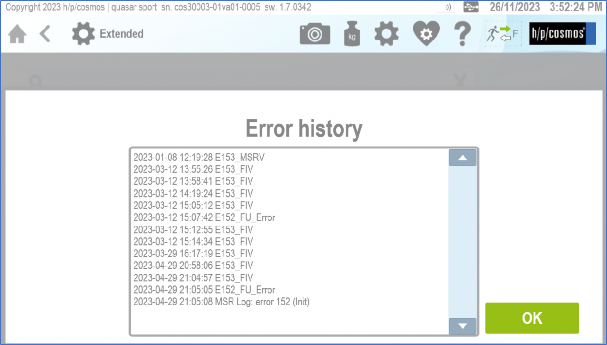
Figure 16: screenshot of error history logfile in MCU6
[13] MCU5 legacy device
h/p/cosmos introduced coscom v4 with the MCU6 device family in 2018. Older devices with MCU5 can be updated (firmware version 1.08.3.0083 and higher) to use coscom v4 with some small limitations. As MCU5 devices do have some display limitations it is not possible to show user specific message when requesting control. Additional MCU5 devices will behave a little different regarding control status (see variable) and request control (see action).
[14] MCU5 coscom v4 Implementation Notes
This section of the document describes the implementation of the coscom v4 in the MCU 5 firmware. The MCU 5 firmware implements only the device type “Treadmill” in the current version (1.08.3.0083 and higher).
Communication settings
The coscom v4 protocol uses a serial link according the RS-232 standard (19200, 8, n, 1). The MCU 5 makes the coscom v4 protocol available on port COM1 with the setting 24 in option 20:
[ 24] [COSC][OM 4]
How to access to user options of MCU 5?
All User Options of MCU5 can be found in the IFU Operation and Service Manual:
section 5.11: Optional settings: User Options, pages 76 … 82. Manual for para control 4.2 software:
Control requester
The coscom v4 specification defines a procedure and the action “RequestControl” to get the
allowance to control the treadmill.
This is a special additional safety feature in order to re-confirm on the keyboard of the UserTerminal, that the patient or subject is ready now and that the running belt may start now. This procedure shall avoid that the treadmill belt will start (initiated by a command from external device like PC, ECG, metabolic cart, etc.) while the patient or subject is not ready yet.
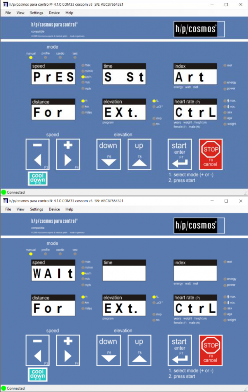
The action “RequestControl” has the argument “Message”, which can be displayed to retrieve the control decision from the user. The MCU 5 firmware ignores this argument and always displays the following message:
[PrES][S St][Art ] [For ][EXt ][CtrL] meaning. “press start for external control” If this message is not answered by a key press within 10 seconds, then the message disappears and control requests are not allowed. The same happens, if a key is pressed other than the Start key. After the confirmation with the Start key and before the first control command the display shows the following text: | |
[WAIt][ ][ ] [For ][Ext.][CtrL] After the control command “Start” or “SetSpeed” the text disappears and the device enters the manual mode. The event variable “ControlAllowed” notifies the external device about the control allowance status. The MCU 5 firmware uses the values “Allowed”, “ControlAllowed“ and “NotAllowed“. The value “TemporaryNotAllowed” is not possible with the MCU 5 firmware, because there is no applicable state in the MCU 5 user interface model. |
Devices without UserTerminal (treadmill variant LT, which have no keyboard and no display):
There is a special treadmill variant (LT) without a display head and without keyboard (UserTerminal). This treadmill can only be operated and controlled via a remote interface connection to a PC, ECG or something similar.
With this configuration it would not be possible to confirm an external control request with a key, because there are no displays and no keys on such treadmills.
Therefore a special setting to “auto-confirm” this request is necessary:
MCU5 treadmill:
Admin-Option 15 of the treadmill:
0 = Confirmation with key “Start”
1 = Auto- Confirmation (LT variant, without UserTerminal = without display and keyboard)
How to access the admin options of MCU 5?
Ask h/p/cosmos service department: service@hpcosmos.com
All Administrator Options of MCU5 can be found in the IFU Operation and Service Manual: https://www.hpcosmos.com/en/contact-support/media-downloads/manuals
section 10: Optional settings: administrator options, pages 148 … 158.
MCU6 treadmill:
If manufacturer option “311 - Equipment Display” is set to “no” request control will immediately be allowed without confirmation of the user
Safety and Validation
For treadmills without UserTerminal (no display and no keyboard) or for configurations where the “auto-confirm” setting (Admin OP 15 parameter 1) is activated, the host device manufacturer (ECG, CPET, PC-software, etc.) has to manage the risks to avoid unexpected starts and dangerous situations by means of appropriate and validated procedures.
Such a procedure could be an additional warning, request and confirmation in the host control software.
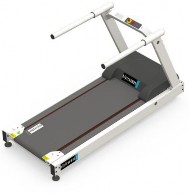
Figure 17: Example h/p/cosmos treadmill without UserTerminal: model “pluto lt med OEM”
| CAUTION! The treadmill will start now! Make sure the patient / subject holds the handrails and is ready for start to walk or run. Use chest belt and safety arch for fall prevention for all medical applications and where a fall would cause high risks to the patient / subject. |
|
Figure 18: Example for “request control” confirmation
Next to the required technical tests and validation a quality assurance and regulatory affairs agreement shall be signed and implemented between the manufacturers of the treadmill and host devices such as ECG, CPET, PC-Software, etc. in order to be in compliance with MDD, MDR, Risk Management ISO 14971 and EN 62304 Software Lifecycle Processes. Example:
https://www.coscom.org/coscom_v4/20250108_hpcosmos_coscom_v4_QA_RA_sample.docx
Pause / Run and stopped belt
There are two different states in the MCU 5 firmware with a stopped belt:
The belt is stopped, the display shows [PAUS] and the time is freezed. coscom v4 ControlStatus = 3 = Pause
The belt is stopped, the display shows [ 0.0] and the time is running. coscom v4 ControlStatus = 2 = Run
Without coscom v4 control
If the speed is decreased to the value 0 either by pressing the key MINUS, another control task or an external communication protocol command, then
Case 1. (Pause) happens in the following situations:
Manual, Profile or Cardio mode is active
Test mode is active and test is not covered by case 2.
Case 2. (Run) happens in the following situations:
Test profile Stepper
Other test profiles except user test profiles Bruce, Naughton, Balke, Ellestad and test profiles 70 and higher
With coscom v4 control
If the value of the status variable ControlAllowed is “Allowed” only case 2 happens independent of the reason how the speed is set to the value 0. At the same time the control status changes from “Allowed” to “NotAllowed”.
The control status can be changed back to “Allowed” if a new “RequestControl” is sent.
Important: the control status can only be changed back to “Allowed” while the belt is stopped!
Anomalies
Some actions and variables are not fully implemented as the specification defines. These are listed here:
Action SetElevationWithSpeed
The action ignores the argument “ElevationSpeed”, because the MCU 5 hardware cannot control the
speed of the elevation mechanism. Otherwise the behaviour of the action is like the action
“SetElevation”.
Variable Height
The variable “Height” is not available in the MCU 5 firmware version, because it would be generating
a lot of computation load for an 8-bit microcontroller (integral, sine…).
[15] Interface cable
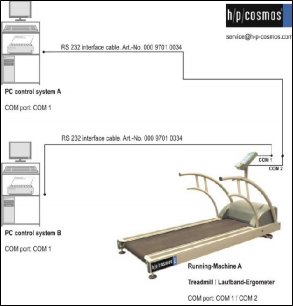
In order to connect your pc to a MCU 5 running machine you must use an interface cable which is wired like in following picture:
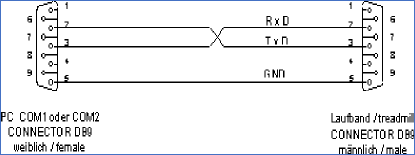
(h/p/cosmos order # cos00097010034)
For further information visit https://www.hpcosmos.com/en/products/supplies-options/interface- connection-cable-rs232-5m
USB RS232 converter / adapter:
If the PC / Laptop computer has no RS232 interface, use a compatible USB-RS232 converter (h/p/cosmos order # cos12769-01)
https://www.hpcosmos.com/en/products/supplies-options/usb-rs232-interface-adapter
[16] Extending h/p/cosmos coscom v4
If you want to extend coscom v4 with vendor specific extensions (new actions or variables) this must be placed in an extra service. In order to avoid collisions, the indices are assigned by h/p/cosmos. Please contact: andreas.feil@hpcosmos.com
[17] Updates, downloads, simulators, regulatory affairs and publications
See website: http://www.coscom.org
Quality Assurance Agreements and Regulatory Affairs Agreements must be agreed among all parties involved. As h/p/cosmos at service@hpcosmos.com for a single page draft agreement.
© Copyright 2025 h/p/cosmos sports & medical gmbh
E & OE. Errors and Omissions Excepted. All rights reserved. Subject to alterations without prior notice.
Attachment:
How to access to admin options of MCU 5?
Ask h/p/cosmos service department: service@hpcosmos.com
Download h/p/cosmos para control 4.2 PC software and install on an PC or Laptop:
Connect the PC or Laptop computer to COM 3 (service port) of the h/p/cosmos treadmill via RS232 interface cable (h/p/cosmos order # cos00097010034)
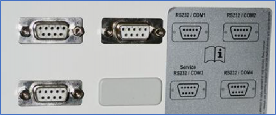
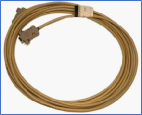
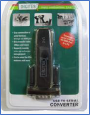
If the PC / Laptop computer has no RS232 interface, use a compatible USB-RS232 converter (h/p/cosmos order # cos12769-01)
USB - RS232 converter must have Chipset FTDI / FT232RL and Full Duplex Interface!
https://www.hpcosmos.com/en/products/supplies-options/usb-rs232-interface-adapter
Enter “access code” for admin options:
To get access to the administrator options the buttons „UP“ and „DOWN“ have to be pressed
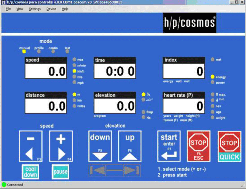
press and hold the keys f (F5) and simultaneously e (F6) and then simultaneously 4 times in a row b(F8)
and hold while then pressing the „STOP“-button 4 times in a row.
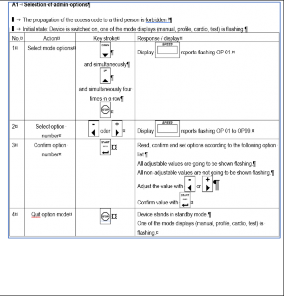
All Administrator Options of MCU5 can be found in the IFU Operation and Service Manual: https://www.hpcosmos.com/en/contact-support/media-downloads/manuals
section 10: Optional settings: administrator options, pages 148 … 158.
Manual for para control 4.2 software:
Video instructions for admin options can be downloaded here:
https://www.hpcosmos.com/en/service https://www.hpcosmos.com/sites/default/files/uploads/videos/20220721_hpcosmos_tutorial_software_update_mcu6.mp4 https://www.hpcosmos.com/sites/default/files/uploads/20210217_cos101000-v1_2_xxxx_hpcosmos_mcu6_software_update_instructions.pdf
Warning! The administrator options are only accessible by h/p/cosmos staff and authorized service engineers. Changing an administrator option might cause serious problems if you are not familiar with all the details. Therefore, the h/p/cosmos service has to be contacted before doing any changes in the administrator options.
Forwarding the access code to unauthorized persons is prohibited.
 Comparison of some interface protocol features, performance and safety standard.
 Schnittstellenprotokoll-Vergleich einiger Funktionen, Leistungsdaten und Sicherheitsstandards.
features and functions | h/p/cosmos® coscom® v3 | h/p/cosmos® coscom® v4 | Trackmaster (TMX 425, 28/03/2003) | T2100 MAX1 |
baudrate, bits, parity | 9600 or 115200 bps Data Bits: 8, Stop Bits: 1, Parity: none | 19200 bps Data Bits: 8, Stop Bits: 1, Parity: none | 4800 bps Data Bits: 8, Stop Bits: 1, Parity: none | 9600 bps Data Bits: 8, Stop Bits: 1, Parity: none |
Encoding Zeichencodierung | UTF-8 UTF-8 | UTF-8 UTF-8 | Mixture of binary and ASCII Mischung aus binär und ASCII | ASCII ASCII |
message length Nachrichtenlänge | Variable, but longer than Trackmaster, since more parameters are possible in one message. Variabel aber länger als Trackmaster, da mehrere Parameter in einer Nachricht möglich sind. | Variable, but longer than Trackmaster, since more parameters are possible in one message. Variabel aber länger als Trackmaster, da mehrere Parameter in einer Nachricht möglich sind. | Variable, but max. 5 bytes. Limitation to functional code and one parameter. Variabel aber max. 5 Bytes. Beschränkung auf Funktionscode und einen Parameter. | Variable, but only one command letter, optional value and carriage return (optional response with string and carriage return). Variabel, aber nur ein Kommando- Buchstabe, optionalem Kommando-Wert und CR (optionale Antwort mit Zeichenkette und CR) |
scope of functions Funktionsumfang | Great scope of functions (speed and elevation control, acceleration levels, failsafe, heart rate, optional functions, profiles, displays, beeper, etc.) Großer Funktionsumfang (Geschwindigkeits- und Steigungsverstellung, Beschleunigungsstufen, Failsafe, Herzfrequenz, Optionen, Profile, Displays, Beeper, usw…) | Reduced but more clearly structured scope of functions compared to coscom v3 (speed and elevation control, acceleration levels, failsafe, heart rate, beeper, etc.). Also supports other types like bicycle ergometers. Reduzierter aber übersichtlicherer Funktionsumfang (Geschwindigkeits- und Steigungsverstellung, Beschleunigungsstufen, Failsafe, Herzfrequenz, Beeper, usw…). Unterstützt auch andere Typen wie Fahrradergometer | Basically speed and elevation control and failsafe. A few other commands exist, but are not executed, at least at the TMX 425 treadmill model. Im Wesentlichen Speed und Elevation Control und Failsafe. Ein paar andere Befehle existieren, werden aber nicht ausgeführt -zumindest bei TMX 425 Laufband. | Basically start/stop, speed unit, faster/slower, set speed, up/down, set grade and get speed/grade. Im Wesentlichen Start/Stopp, Geschwindigkeitseinheit, schneller/langsamer, Setzen der Geschwindigkeit, auf/ab, Setzen der Steigung und Abfrage der Geschwindigkeit/Steigung |
resolution for elevation Auflösung Steigungswinkel | can be set to 0.01 % resolution. limitations in hardware apply, so recommendation is 0.1% auf 0.01 % genau | can be set to 0.01 % resolution limitations in hardware apply, so recommendation is 0.1% auf 0.01 % genau | can be set to 0.1 % resolution auf 0.1 % genau | UP/Down with 0.1% steps and set grade with 0.01% resolution Auf/Ab in 0,1%-Schritten und Setzen mit 0,01% Auflösung |
Messages Benachrichtigungen | Device sends status changes on request. Geräte verschickt auf Wunsch Statusänderungen. | Device sends status changes on request. Geräte verschickt auf Wunsch Statusänderungen. | Status changes always have to be requested (polling). Statusänderungen müssen immer abgefragt (gepollt) werden. | Status changes always have to be requested (polling). Statusänderungen müssen immer abgefragt (gepollt) werden. |
Acknowledgements Acknowledgements | Positive and negative (error messages) Positiv und negativ (Fehlernachrichten) | Positive and negative (error messages) Positiv und negativ (Fehlernachrichten) | No negative replies (error messages); only positive acknowledgements Keine Fehlerantworten (nur positive Acknowledgements) | No acknowledgements but only optional responses to commands Keine Empfangsbestätigungen nur optionale Antworten auf Kommandos |


h/p/cosmos sports & medical gmbh Am Sportplatz 8 DE 83365 Nussdorf-Traunstein / Germany
phone +49 86 69 86 42 0 fax +49 86 69 86 42 49 email@hpcosmos.com www.hpcosmos.com file: n:\article\cos100115-v4\20250917_cos100115v4_hpcosmos_coscom_v4_interface_protocol_treadmills_ergometers_admin_op.docx
© 1988 - 2025 h/p/cosmos sports & medical gmbh author: fh created 17.09.2025 printed 17.09.2025 page: 35 of 39
features and functions | h/p/cosmos® coscom® v3 | h/p/cosmos® coscom® v4 | Trackmaster (TMX 425, 28/03/2003) | T2100 MAX1 |
Failsafe Failsafe | Optional. Setting variable (recommendation 1 second). Expiry is detectable via request. Optional. Einstellung variabel (Empfehlung 1 Sekunde). Ablauf kann über Abfrage festgestellt werden. | Mandatory. Using action for active control required. Expiry is detectable via request. For passive control (read only) no failsafe is needed. Zwingend: Verwendung für aktive Steuerung vorgeschrieben. Ablauf kann über Action festgestellt werden. Für passive Steuerung (lesend) ist kein Failsafe notwendig. | Optional possible. Presetting 0.5 seconds (latest MCU5 implementation: 2 seconds). Expiry is not transmitted. Optional möglich. Vorgabe 0.5 Sekunden (aktuelle MCU5 Implementierung zwei Sekunden). Ablauf wird nicht übermittelt. | Failsafe Timer is activated with the start command. After 4 seconds inactivity the treadmill is stopped. Der Failsafe Timer wird mit dem Start- Befehl aktiviert. Nach 4 Sekunden Inaktivität wird das Laufband gestoppt. |
Checksum | Optional. A message checksum can be activated Optional. Eine Prüfsumme für Nachrichten kann eingeschaltet werden. | Mandatory. A message checksum must be used. Zwingend: Die Verwendung der Prüfsumme für Nachrichten ist vorgeschrieben. | No actual checksum. Echo of received commands optionally possible. Keine Prüfsumme. Echo von empfangenen Kommandos optional möglich. | No checksum. Keine Prüfsumme. |
Request control | Not available Nicht verfügbar | Active external control can request control before sending new commands like setting speed value. Auto-confirm see chapter „control requester“. Aktive externe Steuerungen können um Erlaubnis fragen, bevor extern gesteuert werden kann. Auto-confirm – siehe Kapitel „control requester“ | Not available. Nicht verfügbar. | Not available. Nicht verfügbar. |
IEC 62304 / ISO 14971 | Can be implemented in own projects. Kann in eigenen Projekten implementiert werden. | Can be implemented in own projects. Kann in eigenen Projekten implementiert werden. | unknown unbekannt | unknown unbekannt |
free DLL download and publication | available on www.coscom.org with valuable controls and objects | release version available: https://www.coscom.org/coscom_v4/20210212_cos100115- v4_hpcosmos_coscom_v4_dll_V1.1.0.0.zip | unknown unbekannt | unknown unbekannt |
Firmware update and programming functions and features for treadmill MCU MicroControllerUnit | MCU5 firmware update via RS232 only | MCU6 and/or MCU7 firmware update via RS232, USB or LAN (Ethernet) | no | no |
free Windows PC software for remote control and maintenance kostenlose PC Software für Fernsteuerung und Wartung | para control 4.2 | para control 6 | unknown | unknown |
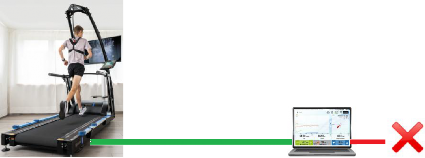
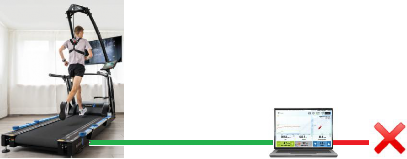


|
|
If an interface protocol does not include a checksum, several potential risks emerge, particularly with regard to data integrity, security, and reliability. The most important risks are: | Wenn in einem Schnittstellenprotokoll keine Prüfsumme (Checksum) enthalten ist, entstehen mehrere potenzielle Risiken, insbesondere im Hinblick auf Datenintegrität, Sicherheit und Zuverlässigkeit. Hier sind die wichtigsten Risiken im Überblick: |
|
Daten führt. |
|
Middle-Angriffen). |
code). |
Hamming-Code). |
communication breakdowns. |
zu Kommunikationsabbrüchen führt. |
industrial or medical applications. |
kritisch in industriellen oder medizinischen Anwendungen. |
Example Scenarios:
| Beispielhafte Szenarien:
es merkt. |
Many older (legacy) devices only have RS232 serial interfaces and no USB or LAN. What does a secure configuration look like? | Viele Altgeräte haben nur serielle Schnittstellen RS232 und noch kein USB oder LAN. Wie kann eine sichere Konfiguration dennoch aussehen? |
RS232 interface connection cable Computer or ECG or VO2max CPET must not be connected to LAN, WiFi, clinical network, CIS or internet! RS232 interface connection cable to the treadmill or ergometer must be monitored and protected against manipulation. | RS232 Schnittstellen-Verbindungskabel Computer oder EKG oder VO2max CPET darf nicht verbunden werden mit LAN, WLAN/WiFi, Kliniknetz, KIS oder Internet! RS232 Schnittstellen-Verbindungskabel zum Laufband / Ergometer muss überwacht und gegen Manipulation gesichert sein. |
Interface and Communication Technology Standards:

 English:
no. | Technology / System / Hardware | Typical Encryption Methods | Encryption Layer | Notes, Cybersecurity, Risks, Advantages, Disadvantages | Security | Security |
1) | RS232 Serial Interface | No native encryption; AES, TLS possible | Application layer | Must be implemented via software (e.g., TLS over tunnel). Advantages: Simple, low latency Disadvantages: No security, easily intercepted | poor | |
2) | USB (as RS232 serial replacement) | No native encryption; AES, BitLocker, hardware-based encryption | Application layer / Hardware | USB sticks can be hardware-encrypted; BitLocker & similar provide OS-based encryption. Advantages: Widely used Disadvantages: Insecure without additional measures | poor | |
3) | USB modern / state of the art | TLS, USB/IP over SSL, Hardware Security Module (HSM), FIDO2 | Application layer / Hardware | Modern devices support secure communication (e.g., USB tokens, dongles). Advantages: High speed, strong encryption Disadvantages: Complex setup | good | |
4) | LAN (Ethernet) | MACsec, IPsec, TLS, SSH, VPN | Link (MACsec), Network (IPsec), Application layer (TLS/SSH) | Advantages: High security by combining protocols Disadvantages: Performance overhead, complex configuration | good | |
5) | Wi-Fi / WLAN | WPA2, WPA3, VPN, TLS | Link (WPA), Application layer (TLS, VPN) | WPA3 is the current standard with forward secrecy. VPN/TLS further enhance security. Advantages: Secure with WPA3 Disadvantages: Vulnerable with weak passwords | good | |
6) | Bluetooth | SSP (Secure Simple Pairing), AES-CCM | Link layer | Since Bluetooth 4.0, AES-CCM is used. Security strongly depends on pairing mode. Advantages: Built-in encryption Disadvantages: Vulnerable to MITM, limited range | medium | |
7) | Mobile Phone / 5G | 128–256-bit encryption (e.g., AES, SNOW 3G, ZUC) | Link and network layer | 5G uses new security architectures such as SUPI/SUCI encryption, network-based authentication. Advantages: Very secure, no user intervention needed Disadvantages: Dependent on provider | good |
|

 German / Deutsch:
Nr. | Technologie / System / Hardware | typische Verschlüsselungsmethoden | Verschlüsselungsebene | Bemerkungen, Cybersicherheit, Risiken, Vorteile, Nachteile | Sicherheit | Sicherheit |
1) | RS232 serielle Schnittstelle | Keine native Verschlüsselung; AES, TLS möglich | Anwendungsebene | Muss softwareseitig implementiert werden (z. B. TLS über Tunnel). Vorteile: Einfach, geringe Latenz Nachteile: Keine Sicherheit, leicht abhörbar | schlecht |
|
2) | USB (als RS232 serieller Ersatz) | Keine native Verschlüsselung; AES, BitLocker, hardwarebasierte Verschlüsselung | Anwendungsebene / Hardware | USB-Sticks können hardwareseitig verschlüsselt sein; BitLocker & Co. bieten OS-gestützte Verschlüsselung. Vorteile: Weit verbreitet Nachteile: Ohne Zusatzmaßnahmen unsicher | schlecht |
|
3) | USB modern / state of the art | TLS, USB/IP über SSL, Hardware Security Module (HSM), FIDO2 | Anwendungsebene / Hardware | Moderne Geräte unterstützen sichere Kommunikation (z. B. USB-Tokens, Dongles). Vorteile: Hohe Geschwindigkeit, starke Verschlüsselung Nachteile: Komplexe Einrichtung | gut | |
4) | LAN (Ethernet) | MACsec, IPsec, TLS, SSH, VPN | Link- (MACsec), Netzwerk- (IPsec), Anwendungsebene (TLS/SSH) | Vorteile: Hohe Sicherheit durch Kombination von Protokollen Nachteile: Performance-Overhead, Konfiguration aufwendig | gut | |
5) | Wi-Fi / WLAN | WPA2, WPA3, VPN, TLS | Link- (WPA), Anwendungsebene (TLS, VPN) | WPA3 ist aktueller Standard mit Forward Secrecy. VPN/TLS erhöhen Sicherheit zusätzlich. Vorteile: Sicher mit WPA3 Nachteile: Angreifbar bei schwachen Passwörtern | gut | |
6) | BlueTooth | SSP (Secure Simple Pairing), AES-CCM | Linkebene | Ab Bluetooth 4.0 wird AES-CCM verwendet. Sicherheit hängt stark vom Pairing-Modus ab. Vorteile: Eingebaute Verschlüsselung Nachteile: Anfällig für MITM, begrenzte Reichweite | mittel | |
7) | Mobiltelefon / G5 | 128–256 Bit Verschlüsselung (z. B. AES, SNOW 3G, ZUC) | Link- und Netzwerkebene | 5G nutzt neue Sicherheitsarchitekturen wie SUPI/SUCI-Verschlüsselung, Netzbasierte Authentifizierung. Vorteile: Sehr sicher, kein Benutzereingriff nötig Nachteile: Abhängig vom Provider | gut |
|
E&OE. Subjects to alterations without prior notice. Irrtum und Änderungen vorbehalten
 Summary:
In secure interface communication, checksums, acknowledgement, failsafe and status communication are mandatory. Validate cybersecurity via PEN-Tests and validate safety features via test and release template: download
RS232 interface connections must be replaced with more modern technology such as LAN/Ethernet or USB if the computer, ECG, or VO2max CPET is to be connected to a LAN, WLAN/WiFi, hospital network, hospital information system, or the internet. In case you still use RS232, the RS232 interface connection cable to the treadmill/ergometer additionally must be monitored and protected against tampering.
As soon as possible, interface communications between treadmills or ergometers should be encrypted to improve cybersecurity.
The h/p/cosmos coscom v4 is an enhancement to coscom v3 especially in terms of safety.
coscom v4 is much more simple in it’s architecture compared to coscom v3, because all special features (like firmware update and programming features) remain in coscom v3. coscom v4 significantly reduces the needed documentation and training time.
Important standards / norms like EN 62304 Software Lifecycle Processes for medical devices and ISO 14971 Risk Management as well as Cybersecurity can be achieved in your projects with coscom v4.
The coscom_v4.dll are a great help for programmers to implement sophisticated functions with minor effort.
coscom v4 allow the use of the free PC software para control, so the treadmills and ergometers can be remote controlled and programmed via external PC or laptop and also important features like firmware update, error diagnostics, resets, etc can be performed via the external h/p/cosmos Windows software para control.
All h/p/cosmos and h/p/cosmos OEM treadmills with MCU5 from manufacturing date 2019 are equipped with coscom v3 and additionally with coscom v4. coscom v3 meanwhile has been discontinued.
Update your ECG, VO2max and CPET devices and other equipment and software to coscom v4 in time, because due to MDR regulatory affairs and technology reasons all new MCU6 UserTerminals with or without TouchScreen launched from the year 2020 for treadmills and ergometers will not have coscom v3 protocols included any more. Only coscom v4 is in compliance with latest cybersecurity requirements.
TMX 425, TMX428, TMX428CP, TMX58 or T2100 or other interface emulations:
Warning and Disclaimer!
This interface protocol is not validated by h/p/cosmos and not released for medical applications in compliance with standard EN 62304 and regulatory compliance.
The system producer / configurator (economic operator) is responsible and liable for sufficient testing, release, validation, regulatory compliance (also MDR (EU) 2017/745, risk management and Cybersecurity) and documentation of these combined devices (h/p/cosmos treadmill and external control device, such as ECG, CPET, stress test device, etc.) in case of utilizing this protocol emulation.
h/p/cosmos rejects all claims and all liability for any issues related to the usage of this interface protocol.
h/p/cosmos validates and recommends only the coscom v4 interface protocol. See www.coscom.org Latest warnings and FSN Field Safety Notices see website: https://www.hpcosmos.com/en/safety
 Zusammenfassung:
In einer sicheren Schnittstellenkommunikation sind Prüfsummen (Checksum), Acknowledgement, Failsafe sowie Statuskommunikation zwingend erforderlich. Validieren Sie Cybersicherheit mittels PEN-Tests und validieren Sie Protokoll Sicherheitsfeatures über das Test- und Release Template: download
RS232 Schnittstellen-Verbindungen müssen ersetzt werden durch modernere Technik wie z.B. LAN/Ethernet oder USB, falls der Computer oder EKG oder VO2max CPET mit LAN, WLAN/WiFi, Kliniknetz, KIS oder Internet verbunden werden soll. Sollten sie weiterhin RS232 verwenden, muss das RS232 Schnittstellen-Verbindungskabel zum Laufband / Ergometer zusätzlich überwacht und gegen Manipulation gesichert sein.
So bald wie möglich sollen Schnittstellenkommunikationen zwischen Laufbänder oder Ergometer verschlüsselt werden zur Verbesserung der Cybersicherheit.
Das h/p/cosmos coscom v4 ist eine konsequente Weiterentwicklung von coscom v3 speziell in Punkto Sicherheit.
coscom v4 ist viel einfacher in der Architektur im Vergleich zu coscom v3, weil alle speziellen Funktionen (wie z.B. Firmware update und Programmierfunktionen) in coscom v3 verbleiben. coscom v4 reduziert den Dokumentationsumfang und die Einarbeitungszeit erheblich.
Einhaltung wichtiger Normen wie EN 62304 Software Lebenszyklus Prozesse für Medizinprodukte und Risikomanagement nach ISO 14971 sowie Cybersicherheit sind mit coscom v4 in ihren Projekten möglich.
Die coscom_v4.dll ist eine grosse Hilfe für Programmierer um moderne Funktionen ohne grossen Aufwand zu implementieren.
coscom v4 ermöglichen die Nutzung der kostenlose PC Software para control, mit der Laufbänder und Ergometer über externen PC oder Laptop ferngesteuert und programmiert werden können und weitere wichtige Funktionen wie Firmware Updates, Fehlerdiagnose, Resets, etc, über diese externe Windows Software para control ermöglichen.
Alle h/p/cosmos und h/p/cosmos OEM Laufbänder mit MCU5 ab Baujahr 2019 sind sowohl mit coscom v3 als auch zusätzlich mit coscom v4 ausgestattet. coscom v3 wurde aber zwischenzeitlich abgekündigt.
Updaten Sie Ihre EKGs, VO2max und CPET Systeme sowie andere Geräte und Software zeitnahe auf coscom v4, weil aufgrund MDR und Regulatorischen Anforderungen sowie aus technologischen Gründen alle neuen MCU6 UserTerminals mit TouchScreen produziert ab dem Jahr 2020 für Laufbänder und Ergometers nicht mehr mit coscom v3 Schnittstellen-Protokollen ausgestattet sein werden, sondern nur noch coscom v4 die aktuellen Cybersicherheitsanforderungen erfüllt.
TMX425, TMX428, TMX428CP, TMX58 oder T2100 oder andere Schnittstellen Emulationen: Warnung und Haftungsausschluss!
Dieses Schnittstellenprotokoll ist nicht validiert durch h/p/cosmos und nicht freigegeben für medizinische Anwendungen in Regelkonformität mit der Norm EN 62304 und regulatorischen Anforderungen.
Der Systemhersteller / Konfigurator (Wirtschaftsakteur / economic operator) ist verantwortlich und haftbar für ausreichende Tests, Freigaben, Validierung, Regelkonformität (auch MDR (EU) 2017/745, Risikomanagement und Cybersicherheit) und Dokumentation dieser verbundenen Geräte (h/p/cosmos Laufband und externes Steuergerät, wie EKG, CPET, Stress Test Gerät, etc.) im Falle einer Verwendung dieser Protokoll Emulation. h/p/cosmos lehnt alle Ansprüche und jegliche Haftung für alle Fälle ab in Zusammenhang mit der Verwendung dieses Schnittstellenprotokolls.
h/p/cosmos validiert und empfiehlt ausschliesslich das coscom v4 Schnittstellenprotokoll. Siehe www.coscom.org Aktuelle Warnungen und Sicherheitshinweise siehe Website https://www.hpcosmos.com/de/sicherheit